If you are searching for macbook warranty details, you are likely trying to confirm whether your device is still covered before repairing or selling it.
Most users do not check this early. They only start searching when something goes wrong, usually battery issues, screen problems, or performance drops. That is also when repair decisions become more sensitive because cost starts to matter.
The good thing is, checking your MacBook warranty takes less than a minute. In this guide, we will walk through exactly how to do it, what the results actually mean, and what your options are once the warranty expires.
1. How to Check MacBook Warranty Expiry Date (Step by Step)
The most accurate way is using the official Apple coverage checker.

Steps:
- Go to Apple Check Coverage page
- Enter your MacBook serial number
- Complete the captcha verification
- Click submit

You will immediately see:
- Warranty status
- Estimated expiry date
- AppleCare eligibility

Where to Find Your MacBook Serial Number
- Click Apple logo
- Click “About This Mac”
- Copy the serial number
This method is always reliable because it pulls directly from Apple’s system. There is no guesswork involved.
2. How to Check MacBook Warranty Without Serial Number
This is one of the most searched variations, but here is the reality.
You cannot check your MacBook warranty without a serial number because Apple tracks coverage per device, not per user.
That said, there are still workarounds.
Option 1: Check directly on your MacBook
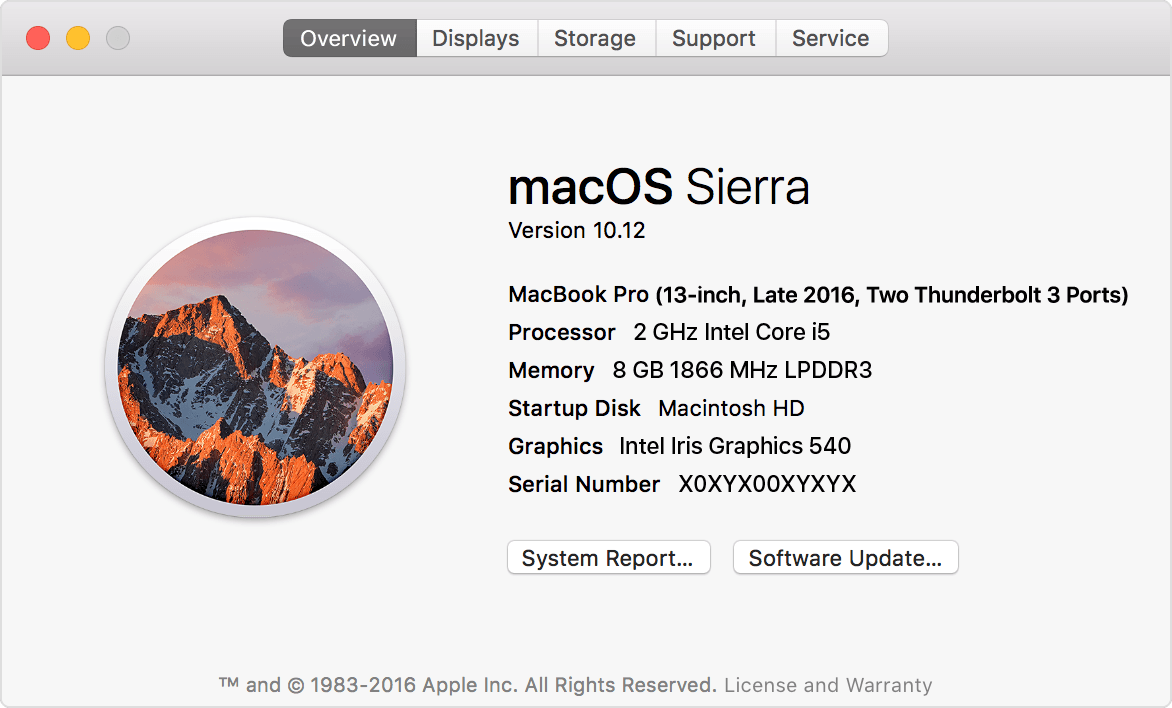
- Go to “About This Mac”
- Click “More Info”
- Click “Check Coverage”
Option 2: Use the Apple Support app
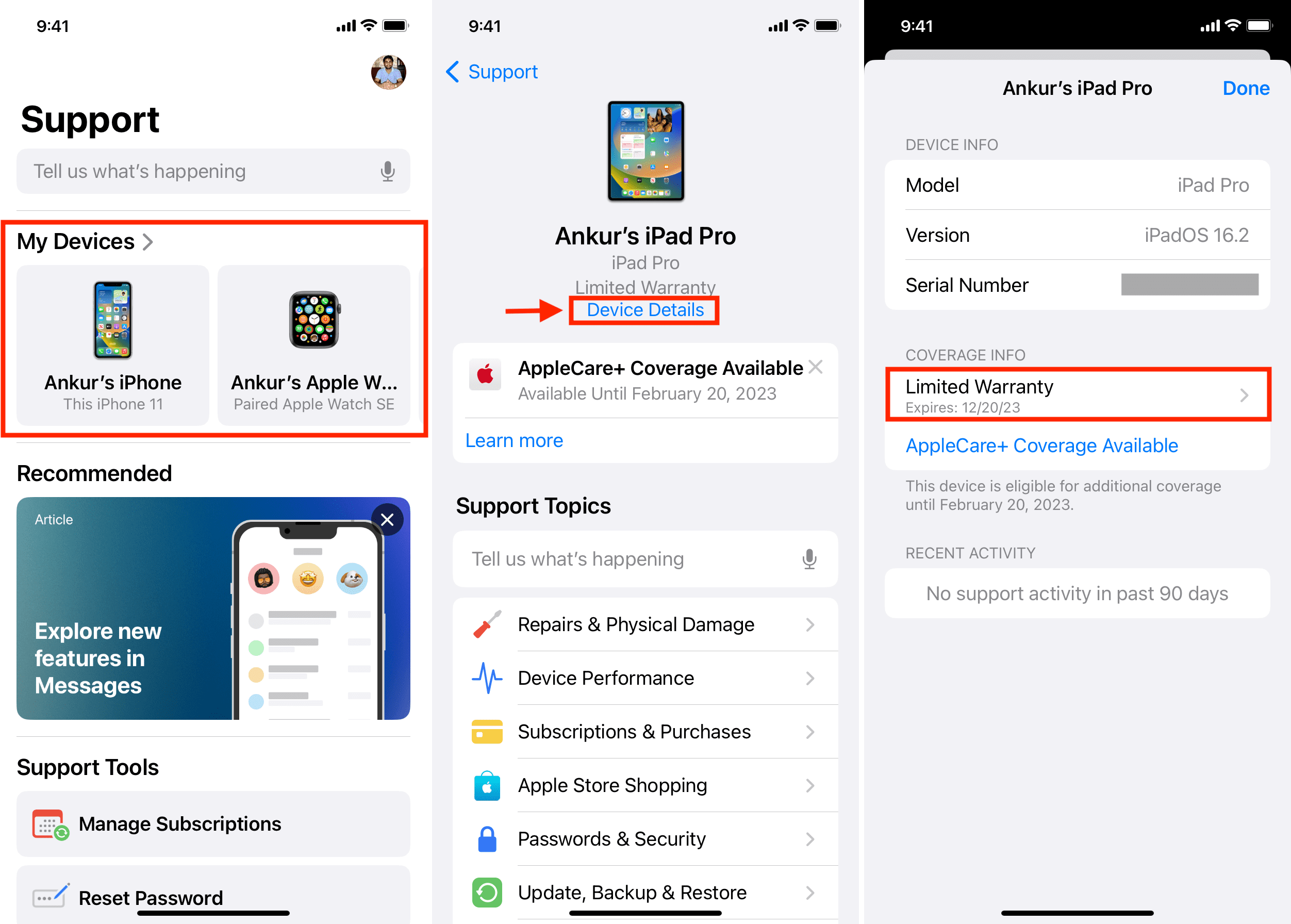
If your device is linked to your Apple ID, you can view basic warranty details there.
In most cases, users who think they do not have their serial number actually still have access to it through their device.
3. How Many Years Is MacBook Warranty?
This is another area where many users get confused.
| Warranty Type | Duration |
|---|---|
| Standard Apple Warranty | 1 year |
| AppleCare+ | Up to 3 years total |
Every MacBook comes with a 1 year limited warranty by defaultAlso read: Does macbook slow down over time?.
If you purchase AppleCare+, you extend coverage and also get protection against accidental damage, although service fees still apply.
A common misunderstanding is thinking Apple provides 2 years by default. That is not the case unless required by specific country regulations.
4. What Does MacBook Warranty Cover?
Before deciding anything, you need to understand what you are actually covered for.
Covered:
- Manufacturing defects
- Hardware failures
- Keyboard, screen, or logic board issues
- Battery issues if performance drops below Apple standards
Not Covered:
- Accidental damage (drops, liquid)
- Cosmetic damage
- Normal wear and tear
Battery Coverage Clarification
Battery is one of the most misunderstood areas.
Apple will only replace your battery under warranty if it fails abnormally. Normal degradation over time is expected and not covered.
This is why many users are surprised when they go to Apple expecting a free battery replacement and get quoted instead.
5. Is Apple Warranty International?
Yes, but it is not always as straightforward as people expect.
Apple warranty is generally international, which means you can service your MacBook outside the country of purchase.
However:
- Service availability depends on local Apple providers
- Certain parts may not be immediately available
- You may be asked for proof of purchase
In real cases, this sometimes leads to delays rather than outright rejection.
6. How to Know If Your MacBook Is Still Under Warranty
Once you check your coverage, you will see one of these:
| Status | Meaning |
|---|---|
| Active | Warranty still valid |
| Expired | Warranty has ended |
| AppleCare Active | Extended warranty is active |
| Eligible for AppleCare | Still within purchase window |
Always verify this before doing any repair. It sounds simple, but many users skip this step and regret it later.
7. Can You Extend MacBook Warranty After Purchase?
You can, but timing is strict.
AppleCare+ must usually be purchased within 60 days from the date of purchase.
After that, you cannot extend your warranty anymore.
This is another situation we see quite often. Users only consider extending warranty after a problem appears, but by then, the window is already closed.
8. What Happens When MacBook Warranty Expires
This is where things start to get expensive.
Once your warranty expires:
- All repairs become chargeable
- Apple service pricing can be significantly higher
- No free hardware replacement
Real Scenario We See Frequently
At RepairX, this situation comes up almost daily, especially with MacBooks that are around 2 to 4 years old.
Users come in thinking their device is still under warranty, only to find out it expired months ago. The issue could be something relatively common like battery swelling or display problems.
At that point, they are deciding between:
- Paying Apple’s out of warranty repair pricing
- Looking for a more cost-effective repair option
The key takeaway here is simple. Always check your warranty first before doing anything else.
9. Should You Still Repair After Warranty Expiry?
Not every expired MacBook needs to be replaced.
It depends on:
- Device age
- Type of issue
- Repair cost vs replacement value
For example:
- Battery replacement is usually one of the most cost-effective repairs, especially for MacBooks around 2 to 4 years old
- Screen replacement depends heavily on model value
- Logic board issues require proper diagnosis before deciding
At RepairX, we often see users jump straight to buying a new laptop when the issue could have been resolved at a much lower cost.
A proper assessment makes a big difference here.
Expert Insights
From a practical standpoint, checking your MacBook warranty is not just about eligibility. It directly affects your repair strategy.
We recommend:
- Always checking warranty before diagnosing issues
- Not assuming your device is still covered
- Comparing Apple repair costs with alternative options
In real repair scenarios, one of the most common patterns we see is users only checking warranty after visiting an Apple service centre. That is usually when they realise the cost is higher than expected.
Knowing your warranty status earlier gives you more control and avoids unnecessary surprises.
FAQs
How do I check my MacBook warranty?
Use Apple’s official coverage checker and enter your serial number.
Can I check Apple warranty using serial number?
Yes. This is the official and most accurate method.
Is MacBook warranty 1 year or 2 years?
Standard warranty is 1 year. AppleCare extends it up to 3 years.
Does Apple warranty cover battery replacement?
Only if the battery fails due to defect, not normal wear.
Can I transfer MacBook warranty to another owner?
Yes. Warranty is tied to the device, not the owner.
Conclusion
Checking your MacBook warranty expiry date is one of the simplest but most important steps you can take.
It takes less than a minute, but it determines whether you can save money on repairs or need to plan for alternative solutions.
If your warranty has expired, the next step is to evaluate your options properly. Whether you choose Apple service or a third party provider like RepairX, the goal is to make a decision based on actual cost and device condition, not assumptions.