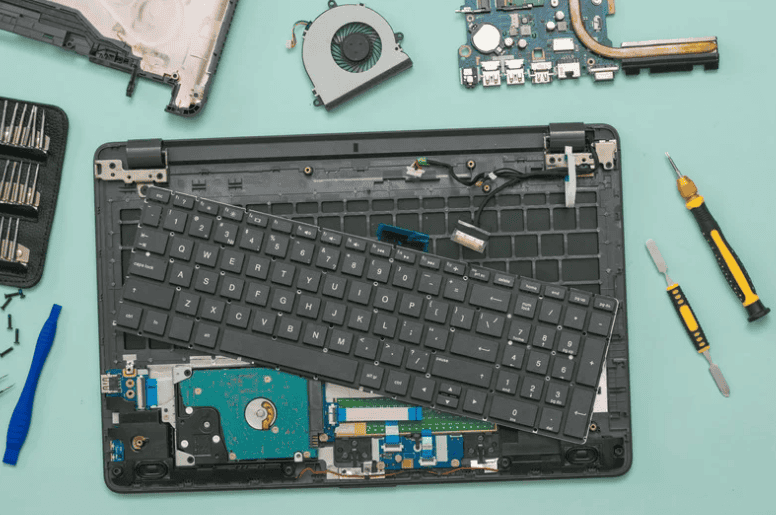
For many users in Singapore, the laptop keyboard is the most heavily used part of the machine. Coffee at the office, meals at the desk, humid weather, and daily travel all increase the chance of stuck keys, dead rows, or liquid damage.
Unlike an external keyboard, a laptop keyboard is tied directly to the device. Once it fails, it affects your productivity, and in some cases, it can even allow liquid to reach the motherboard.
This guide explains the most common keyboard failure symptoms, how design differences between brands affect replacement difficulty and cost, and what typical laptop keyboard replacement Singapore price ranges look like. It is written to help you decide logically whether to repair, replace, or temporarily use an external keyboard.
Common Signs You May Need a Keyboard Replacement

Some issues can be fixed with cleaning, but others are strong indicators that the keyboard itself is damaged.
| Symptom | What It Usually Means |
|---|---|
| One or two keys occasionally stick or feel rough | Dirt or debris under the keycap. Sometimes fixable with careful cleaning. |
| Whole rows or groups of keys not working | Often liquid damage or keyboard matrix failure. Cleaning rarely fixes this once corrosion sets in. |
| Keys output wrong characters or multiple characters | Possible liquid residue or internal short on the keyboard circuit. |
| Backlight does not turn on anymore | Backlight circuit on the keyboard has failed or the cable is damaged. |
| Keyboard works intermittently after a spill | Initial drying may help, but recurring faults usually mean corrosion and a high chance that replacement is needed. |
If the problem is very localised and there was no spill, cleaning and individual key repair may help. If there was any liquid spill and multiple keys are affected, a full keyboard replacement is usually the reliable solution.
Different Laptop Keyboard Designs And Why They Matter

The cost and difficulty of keyboard replacement depends heavily on how the manufacturer designed the laptop.
1. Modular Keyboard Design
Many traditional business laptops, especially older or classic Lenovo ThinkPad models, use a modular keyboard that is held in with screws or clips and connected with a simple cable.
Characteristics:
- Keyboard can be removed from the top or bottom after a few screws are released.
- Replacement often does not require removing every internal component.
- Parts are easier to source for popular models and generations.
Common examples:
- Many Lenovo ThinkPad T and L series generations.
- Some Dell Latitude and HP ProBook or older EliteBook models.
2. Integrated Keyboard With Top Cover
Newer slim business and consumer laptops increasingly use keyboards that are part of a larger top cover or palm rest assembly. For some HP EliteBook and similar models, most internal parts must be moved to the new top cover, and the old one is effectively a shell.
Characteristics:
- Keyboard is riveted or bonded to the top cover.
- Replacement may mean replacing the entire top cover, not just the key matrix.
- Nearly full disassembly is often required, so labour cost is higher.
3. Top Case With Keyboard And Battery (MacBook Style)
Recent MacBook Pro and MacBook Air models typically use a top case assembly where the keyboard, palm rest, and battery are all part of one unit. The battery is glued in and Apple documents and repair communities warn against removing it from the top case.
Characteristics:
- For many models, authorised and third party repairers replace the entire top case when addressing major keyboard or battery issues.
- This raises the parts cost compared to a simple keyboard swap.
- The repair is complex and time consuming, which also affects labour pricing.
From a repair planning point of view:
- Modular keyboards are generally cheaper and faster to replace.
- Integrated top cover designs cost more in both parts and labour.
- MacBook style top cases sit in the highest band, because keyboard, battery, and palm rest are bound together.
When Cleaning Is Enough And When Replacement Is Smarter
Situations Where Cleaning Might Help
- A single key feels sticky after crumbs or dust.
- No known liquid spill, and only mechanical feel is affected.
In these cases, careful removal of the keycap and gentle cleaning may restore normal feel. If you are not comfortable doing this yourself, a technician can perform a professional clean.
Situations Where Replacement Is The Real Solution
- Any liquid spill that results in groups of keys failing, repeating, or behaving unpredictably.
- Rows of keys that never recover even after proper drying.
- Backlight failure after a spill or after physical impact.
- Physical damage, such as a cracked or badly bent keyboard deck.
In these conditions, cleaning may temporarily improve behaviour but will not stop corrosion or circuit damage. A full keyboard or top case replacement is usually the most reliable path.
Laptop Keyboard Replacement Cost in Singapore (2026 Estimates)
Pricing varies by model, design, and parts availability, but this table shows typical 2026 estimate bands in Singapore:
| Device Class | Example Types | Estimated Keyboard Replacement Cost (SGD) |
|---|---|---|
| Standard Windows laptop (modular keyboard) | Many mid range Acer, Asus, Dell, Lenovo, HP consumer and older business models | 120–220 |
| Business class with integrated top cover | Newer HP EliteBook, some Dell Latitude and Lenovo thin business models | 180–320 |
| Premium ultrabook (slim aluminium designs) | High end Zenbook, XPS, Yoga Slim, Spectre, similar thin and light models | 220–380 |
| MacBook top case with keyboard and battery | MacBook Pro and Air with glued battery top case assemblies | 380–650 |
Disclaimer: These are approximate ranges for Singapore. Actual pricing depends on your exact model, part availability, layout (for example backlit or non backlit), and whether only the keyboard or a full top case is replaced. Contact RepairX.sg for accurate quotes based on your device.
Because labour is a significant part of these jobs, design complexity matters as much as the raw cost of the parts.
How RepairX.sg Handles Laptop Keyboard Replacement

When you bring a laptop with keyboard issues to RepairX.sg, the process typically looks like this:
- Diagnosis
- Confirm that the problem is limited to the keyboard and not the motherboard or keyboard controller.
- Check for signs of liquid entry, corrosion, or internal short circuits.
- Design Assessment
- Identify whether your model uses a modular keyboard, integrated top cover, or MacBook style top case.
- Explain clearly what needs to be replaced and why, with part and labour implications.
- Parts Sourcing
- Match the correct layout (for example US, UK, backlit) and ensure compatibility with your exact model number.
- Replacement And Testing
- Perform disassembly as required for your design.
- Install the new keyboard or top case, reassemble, and test all keys and backlight.
- Warranty
- All keyboard related replacements at RepairX.sg include a 90 day warranty on parts and labour, so you have peace of mind after the repair.
Expert Insights
- If you are a heavy typist or write frequently, the feel of the keyboard and the ease of replacement should be part of your purchase decision, not an afterthought. Classic business lines like ThinkPad are designed with serviceability in mind, and some still allow relatively straightforward keyboard swaps.
- Slim ultrabooks and MacBooks are attractive and portable, but their integrated designs can increase keyboard repair cost, especially when keyboard and battery share the same top case.
- For any liquid spill, the safest move is to power down immediately, disconnect power, and avoid continued use until a technician inspects the device. Continuing to use it can worsen corrosion and increase the chance that the motherboard is affected, not just the keyboard.
- Sometimes, if the laptop is old and the keyboard repair cost approaches the value of the machine, it can be more economical to put the money toward a new laptop and use an external keyboard temporarily while you plan the upgrade.
FAQs
Q1: Can I just use an external USB keyboard instead of replacing the laptop keyboard?
Yes, many users do this as a temporary solution, especially for older laptops. However, this is less convenient for travel, and if there was a liquid spill, you still risk unseen damage progressing inside the laptop if it is not properly inspected.
Q2: I spilled water on my laptop. What should I do immediately?
Power off the laptop, unplug the charger, and avoid turning it back on until it has been opened and inspected. Water can short circuits and cause further damage. In many cases, the keyboard needs replacement after a spill, especially if groups of keys stop working or behave unpredictably.
Q3: Are some laptop brands better for keyboard repair than others?
From a service perspective, traditional business models such as many ThinkPads, Latitude, and older EliteBook units are designed with easier keyboard replacement in mind. Newer slim ultrabooks and MacBooks favour thinness, which often leads to integrated or top case designs that are more complex and costly to repair
Q4: How long does a replacement keyboard usually last?
With normal use and no further spills, a replacement keyboard should last similar to the original, often several years. Failures are usually caused by liquid damage, impact, or very heavy wear, rather than simple age.
Q5: Can individual keycaps be replaced instead of the whole keyboard?
Individual keycaps can sometimes be replaced if only the plastic cap or hinge is damaged. However, if the underlying switch, backlight, or circuit is faulty, a full keyboard replacement is the more reliable fix.
Conclusion
Laptop keyboard issues are extremely common in Singapore, especially with daily typing, humid conditions, and frequent food and drink near devices.
Understanding the difference between modular keyboards, integrated top covers, and MacBook style top cases helps you predict both the difficulty and cost of a future keyboard repair. It also helps you make a smarter purchase decision if you type heavily or are prone to spills.
RepairX.sg supports users through that entire life cycle. With clear diagnosis, realistic price ranges, design specific explanations, and a 90-day warranty on keyboard replacements, you can treat laptop keyboard replacement as a planned maintenance event instead of a stressful surprise.