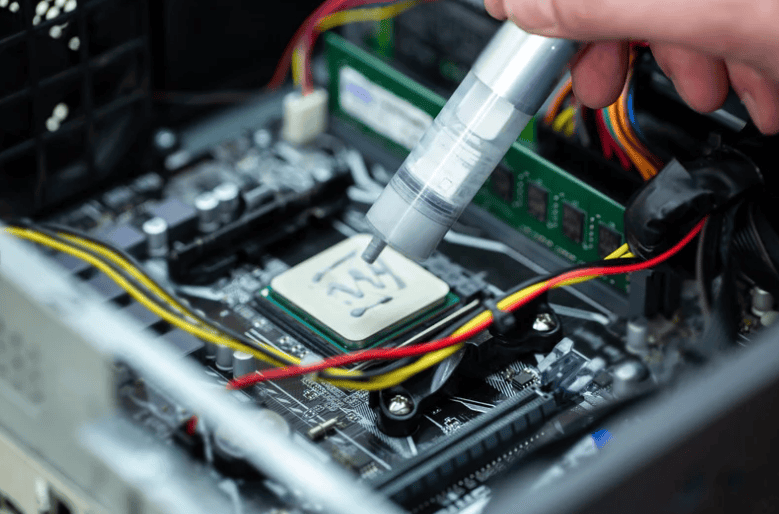
Dust, Heat, And Why Laptops Age Faster Than You Think
Singapore is hot and humid, and many people use laptops on beds, sofas, and shared tables. Over time, dust and lint get pulled into the vents and fans. Thermal paste between the CPU or GPU and the heatsink also dries out slowly.
The result is simple. Higher temperatures, louder fans, sudden slowdowns, and in the worst cases, permanent hardware failure. Multiple independent repair and IT articles confirm that dust buildup blocks airflow, raises internal temperatures, and can damage components if left unchecked.
This guide explains what cleaning and thermal paste service actually do, how often they make sense for different users, and what typical price ranges in Singapore look like. The goal is to help you decide when it is worth paying for preventive maintenance and when you can safely wait.
What Dust And Old Thermal Paste Actually Do To A Laptop
Dust buildup
Dust and lint accumulate on vents, fans, and heatsinks. Over time this:
- Restricts airflow and traps heat inside the laptop.
- Forces fans to spin faster and louder to compensate.
- Causes components to run hotter, which leads to thermal throttling where the system slows itself down to avoid damage.
- In extreme cases, increases the risk of fan failure and long term damage to the motherboard, GPU, and other components.
Several repair and maintenance guides describe dust as one of the most common causes of overheating and system failure, particularly in laptops and compact systems.
Aging thermal paste
Thermal paste fills microscopic gaps between the CPU or GPU and the heatsink, improving heat transfer. Over time, heat cycles and age can cause it to dry or pump out, especially in laptops that run hot.
There is no single fixed interval, but multiple enthusiast and technical sources suggest that:
- Many systems do well with thermal paste refresh roughly every 2–3 years, especially if they run hot or under heavy load.
- In practice, many users only repaste when they see temperatures rising or when they open the laptop for a fan or dust service anyway.
Signs Your Laptop Needs Cleaning or Thermal Service
You do not need to guess. Your laptop usually gives very clear clues.
| Symptom | Likely Cause |
|---|---|
| Fans much louder than when the laptop was new, even at light loads | Dust on fans and heatsinks, or blocked vents. |
| Laptop feels very hot at the bottom or near vents during normal use | Dust buildup reducing airflow, or dried thermal paste reducing heat transfer. |
| Performance drops or stutters when gaming or editing | Thermal throttling due to high CPU or GPU temperatures. |
| Sudden shutdowns or crash under load | Severe overheating, often made worse by dust and weak cooling. |
| Temperatures stay high even after fan cleaning | Thermal paste may have aged and is no longer transferring heat effectively. |
If you see several of these symptoms together, particularly loud fans and high temperatures, professional cleaning and possibly a paste refresh are usually worth serious consideration.
How Often Should You Clean And Repaste?
There is no one size fits all answer, but there are sensible ranges supported by manufacturer and repair guidance.
External and light cleaning
Most guides recommend regular basic cleaning, such as wiping surfaces and blowing dust from vents. One manufacturer oriented guide suggests that a general external cleaning schedule of about once per quarter is reasonable, and even more often if the laptop is used in dusty or outdoor environments.
Internal dust cleaning and fan service
For internal dust removal and fan cleaning, sources aimed at gaming laptops provide more specific ranges. For example, an HP Omen maintenance guide suggests:
- Normal use: clean internally every 6–12 months
- Dusty environment or pets: every 3–4 months
- Intensive gaming: every 4–6 months
For typical users in Singapore, a practical rule is:
- Office and casual use: internal cleaning roughly every 12–24 months, unless symptoms appear earlier.
- Gaming and creator laptops: internal cleaning roughly every 6–12 months, more frequently in dusty rooms or if you have pets.
Thermal paste refresh
Expert and community recommendations vary, but common guidance is:
- Replace thermal paste roughly every 2–3 years for systems that run hot, particularly gaming laptops.
- Replace earlier only if temperatures have clearly risen compared to when the laptop was new and dust has already been cleaned.
In other words, for many users it is sensible to pair a full dust cleaning and fan service with a thermal paste refresh roughly every 2–3 years, or sooner if temperature problems appear.
Is It Worth Paying For Professional Service Instead Of DIY?
Removing dust from vents with a soft brush or compressed air from the outside is relatively low risk. However, proper internal cleaning and repasting require opening the laptop, removing the heatsink and sometimes the fan assembly. A detailed guide from Instructables notes the need for disassembly experience and care with alcohol cleaning and fan handling.
Professional service is usually worth it if:
- The laptop is expensive or still fairly new.
- You are not comfortable disassembling electronics.
- The fans, heatsinks, or thermal paste are hard to access.
- You want the opportunity for a technician to spot early signs of other problems, such as cracked fan blades or heat damaged components.
Laptop Cleaning And Thermal Paste Service Cost In Singapore (2026 Estimates)
Prices vary by model complexity, but these ranges give a realistic sense for Singapore:
| Laptop Type | Example Use Case | Internal Dust Cleaning And Fan Service (SGD) | Cleaning Plus Thermal Paste Refresh (SGD) |
|---|---|---|---|
| Basic office or student laptop | Integrated graphics, light workloads | 60–120 | 90–150 |
| Mid range multimedia or light gaming laptop | Slim designs with one fan and heatsink | 80–150 | 120–200 |
| Gaming or creator laptop with dedicated GPU | Dual fan, multiple heatpipes, more complex cooling | 120–220 | 160–260 |
Disclaimer: These are approximate 2026 estimate ranges for Singapore. Actual pricing depends on your specific model, how difficult it is to disassemble, and whether any parts, such as fans, need replacement. Contact RepairX.sg for accurate quotes based on your device.
Compared to the cost of a motherboard or GPU replacement, this preventive maintenance is relatively affordable.
How RepairX.sg Handles Cleaning And Thermal Paste Service

At RepairX.sg, a proper laptop cleaning and thermal service typically includes:
- Initial diagnosis
- Check temperatures, fan behaviour, and performance symptoms.
- Inspect vents and exterior for obvious dust buildup and airflow blockages.
- Controlled disassembly
- Carefully open the chassis, remove covers, and access the cooling assembly.
- Disconnect fans and heatsinks with appropriate ESD precautions.
- Dust removal and fan servicing
- Clear dust from fans, heatsinks, and motherboard using proper tools.
- Check fan bearings and blades for wear or damage.
- Thermal paste refresh (if included)
- Clean old thermal paste from CPU and GPU surfaces.
- Apply high quality thermal compound in a controlled, even layer.
- Reassembly and testing
- Reassemble the device, verify fan operation, and run temperature and load tests.
- Confirm that temperatures and fan noise are improved compared to the initial state.
- Warranty
- All cleaning and thermal related services that involve parts replacement, such as new fans, are covered by a 90 day warranty on parts and labour.
Expert Insights
- Multiple repair and maintenance sources agree that dust is a major cause of overheating, thermal throttling, and eventual hardware failure, particularly in compact devices like laptops.
- Regular cleaning and maintenance are repeatedly linked to longer device lifespan, more stable performance, and fewer emergency repairs.
- Manufacturer guidance and repair shops commonly recommend more frequent internal cleaning for gaming laptops, because they run hotter and pull more air through their cooling systems, which also pulls more dust.
- There is broad agreement that thermal paste refresh is most useful after a few years or when there are clear temperature issues, rather than as an annual ritual on otherwise cool running systems.
FAQs
Q1: How do I know if I really need internal cleaning and repaste, not just external dusting?
If your laptop is noticeably hotter and louder than when it was new, and performance drops under load, internal dust and possibly aged thermal paste are likely contributing factors. External dusting can help a little, but it cannot remove dust that has already built up on internal heatsinks and fan blades.
Q2: Is it safe to do dust cleaning myself with compressed air?
Blowing compressed air into vents from the outside can remove some dust, but it can also push other dust deeper into the system if you are not careful. For surface dust, it is generally safe. For deep cleaning and anything that requires opening the laptop, professional service is safer unless you have experience with disassembly.
Q3: How often should a gaming laptop in Singapore be cleaned internally?
A reasonable target is every 6–12 months, and more often if the environment is dusty or if pets are present. Manufacturer style guidance for gaming systems often recommends shorter intervals than for office use because of higher heat and airflow.
Q4: Will cleaning and repasting make an old laptop feel new again?
Cleaning and repasting can significantly reduce temperatures and fan noise, and prevent throttling, especially if the laptop was heavily clogged or the paste was very old. It will not turn a ten year old CPU into a new one, but it can make an older laptop feel more stable and responsive under load.
Q5: Does RepairX.sg offer cleaning without repaste, or must both be done together?
RepairX.sg can offer cleaning alone or cleaning plus thermal paste, depending on your laptop’s age, temperature behaviour, and budget. For newer devices with good thermal performance, cleaning alone may be enough. For older and hotter systems, pairing cleaning with paste refresh is often recommended for best results.
Conclusion
In Singapore’s climate, laptop cleaning and thermal paste service is not a luxury. It is a practical way to keep heat under control, reduce fan noise, and avoid expensive failures caused by dust and age.
- Office and student laptops often benefit from internal cleaning every 12–24 months.
- Gaming and creator laptops see real benefits from cleaning every 6–12 months, especially in dusty rooms.
- Thermal paste refresh roughly every 2–3 years, or when temperatures clearly rise, is a sensible balance between effort and benefit.
Treating these services as part of your laptop’s life cycle, rather than as an emergency reaction when the system is already crashing, can save money and extend the useful life of the device.
RepairX.sg supports that preventive approach with clear diagnostics, realistic cleaning and repaste price ranges, and a 90 day warranty on related repairs, so you can keep your laptop cool, stable, and productive for as many years as possible.